Kimi K3 API Pricing: Cache Hits, OpenRouter & Cost Control
Kimi K3 hub: Specs, model id, when to switch → /kimi-k3. Free product try → how to use K3 for free. Practical doors this week → how to use Kimi K3.
You typed kimi k3 free api or kimi k3 pricing after a feed said the model is “open.” Then you opened the developer console and saw a rate card that looks nothing like “free forever.”
That gap is normal. Product free tiers and paid API keys are different doors. This guide is only about the bill you get when you call kimi-k3.
Short answer (read this first)
- There is no permanent free production API for full
kimi-k3. Free chat / rewards live on the product surface (kimi.com). Keys on platform.kimi.ai are pay-as-you-go. - List price (USD / 1M tokens, late July 2026 public docs): cache-hit input $0.30 · cache-miss input $3.00 · output $15.00. Flat across the 1M context window—no “long context surcharge” on the public K3 card.
- The real savings lever is cache + model routing, not hunting fake free keys. Reuse long system prompts and repo context; send routine work to cheaper models; reserve K3 for hard, long jobs.
- Max-effort thinking is on by default on K3 (you can’t flip a “cheap mode” switch yet in public docs). Trivial prompts can still burn expensive reasoning tokens—don’t use K3 as a toaster.
One sentence: use free product to feel the model; use the paid API when you need automation—and treat $15/M output + always-on thinking as a budget feature, not a detail.
This site is independent of Moonshot. Prices and capacity change—confirm on K3 pricing and K3 quickstart before you put a team on autopilot.
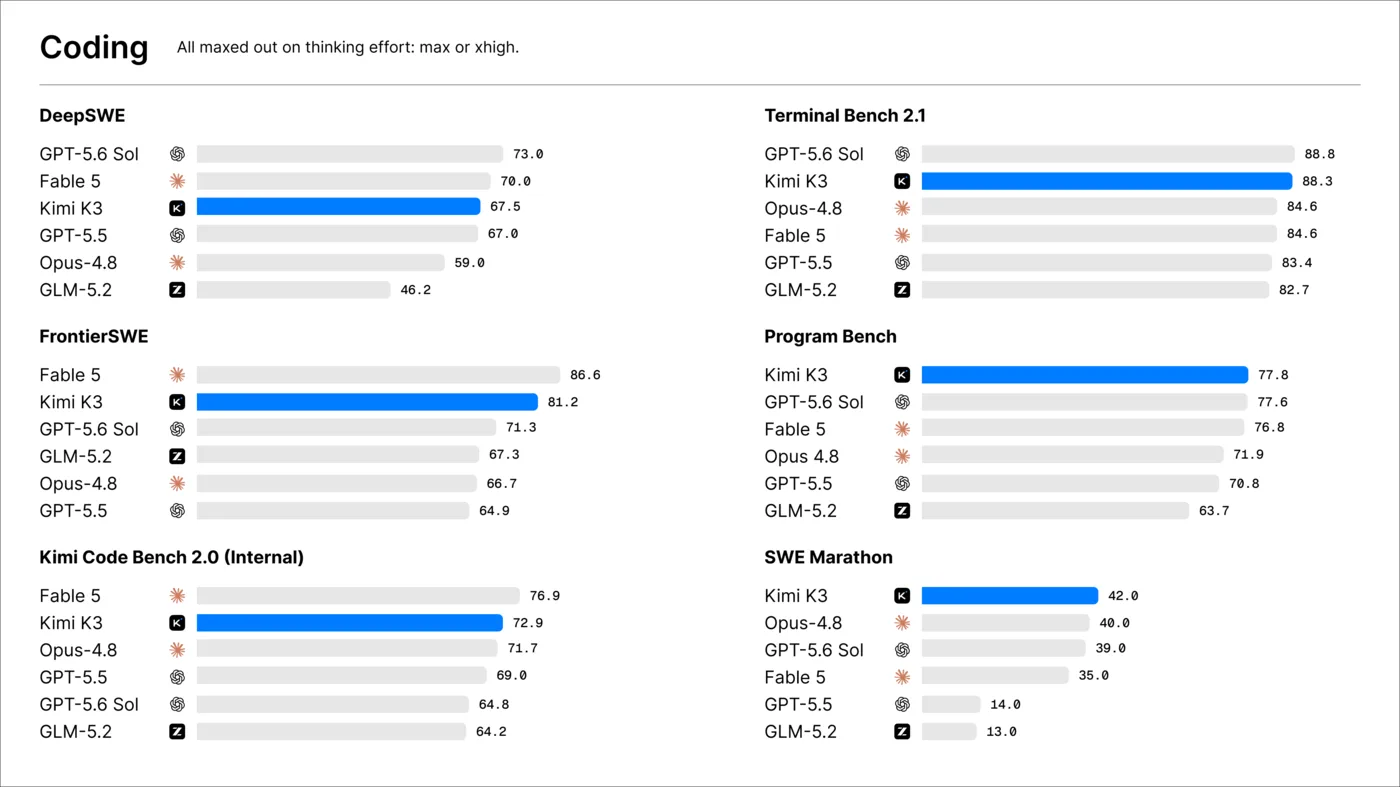
Source: Official @Kimi_Moonshot K3 launch media, July 16, 2026; same charts as the Kimi K3 blog.
The rate card in plain English
| Line item | Rough meaning | USD / 1M tokens |
|---|---|---|
| Cache-hit input | “You already paid to send this context recently; we’re reusing it.” | $0.30 |
| Cache-miss input | Fresh tokens the model hasn’t cached for this request path | $3.00 |
| Output | Tokens the model writes back—including long reasoning traces | $15.00 |
| Context window | How much of a project you can hold in one call | 1M tokens (flat pricing on the public card) |
| Model id | What you put in the API request | kimi-k3 |
Three translations people miss:
- $3 / $15 is “Sonnet-tier,” not “K2 promo pricing.” If your job is a 20-line refactor, a cheaper coding model often wins on cost.
- $0.30 cache hits are the quiet hero. Agents that re-send the same system prompt, style guide, or monorepo snapshot get a 90% input discount on the repeated part—when caching works as documented.
- Output is where bills explode. Long tool loops + long chain-of-thought = many $15/M tokens. A “simple test” that overthinks can still cost real money.
Official deep links: platform.kimi.ai · pricing/chat-k3 · context caching guide.
Free product vs paid API (stop mixing them)
| Path | What you get | What you pay |
|---|---|---|
| kimi.com / app free + rewards | Chat / agent UX with quotas | $0 until limits; membership may unlock more |
| Membership / Code membership | Product entitlements (not the same as raw API metering) | Plan price (check membership pricing) |
API kimi-k3 | Keys, tools, automation, OpenAI-compatible base URL | Token meter — $0.30 / $3 / $15 |
OpenRouter moonshotai/kimi-k3 | Same model via a multi-model router | Same $3 / $15 band on public listings; capacity can throttle |
Searching “kimi k3 free api key” usually means one of three mistakes:
- Wanting product free chat (correct door: free guide)
- Wanting forever-$0 production keys (not a public promise)
- Landing on scam key dumps (never paste keys from random gists into production)
If new subscriptions are paused on the consumer side, the API can still be a separate door—see subscription pause guide.
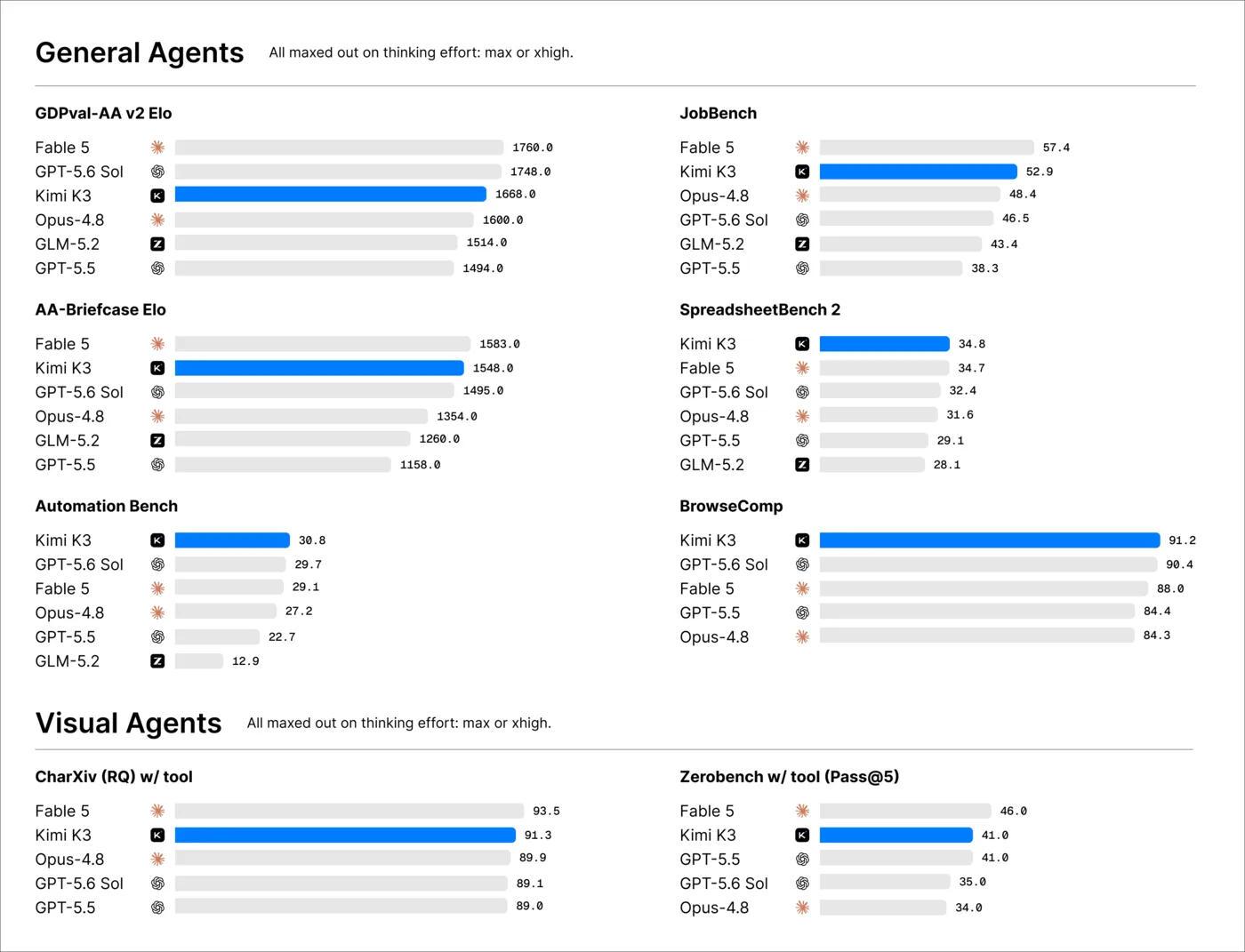
Source: Official @Kimi_Moonshot K3 launch media, July 16, 2026.
Why your first invoice feels worse than the rate card
K3 is built for long-horizon coding, knowledge work, and deep reasoning. That shows up as:
- Always-on thinking (max effort at launch). Public docs say you can’t simply “turn off” chain-of-thought on K3 the way some models expose low/medium effort. Cheap “hi” prompts are still a bad habit.
- 1M context is a power tool, not a free snack. Stuffing half a monorepo on every call without caching is how $3 input becomes the main event.
- Agent loops multiply output. Plan → tool → patch → re-read → plan again. Each step writes tokens at $15/M.
Rough mental math (illustrative only—not a quote):
| Toy job | Inputs that matter | What to watch |
|---|---|---|
| 2k-token prompt, 500-token answer, no cache | Small | Still prefer a cheap model if the task is trivial |
| 100k-token repo context, 80% cache hit next turn | Cache | Input collapses toward $0.30 on the hit portion |
| Multi-hour agent, 200k output tokens of reasoning | Output | $15 × 0.2 = $3 just for that slice—before input |
Always read usage dashboards, not blog arithmetic, for production.
OpenRouter vs direct Moonshot
| Direct Moonshot | OpenRouter | |
|---|---|---|
| Model id | kimi-k3 | moonshotai/kimi-k3 (aliases may exist) |
| Base URL | https://api.moonshot.ai/v1 | OpenRouter’s OpenAI-compatible endpoint |
| Price band | Official $0.30 / $3 / $15 | Public listings commonly $3 / $15 with cache fields |
| Why pick it | Lowest overhead, official docs, prompt caching path | One key for many models; fast experiments |
| Watch-outs | Account + billing setup | Upstream capacity / 429s when K3 is hot |
Neither path is “free API.” Both are routers to a metered flagship.
Minimal direct call shape (store keys in env, never in git):
import os
from openai import OpenAI

client = OpenAI(
    api_key=os.environ["MOONSHOT_API_KEY"],
    base_url="https://api.moonshot.ai/v1",
)

resp = client.chat.completions.create(
    model="kimi-k3",
    messages=[{
        "role": "user",
        "content": "Propose a migration plan for a 200-file TypeScript monorepo. Keep the plan under 800 words.",
    }],
)
print(resp.choices[0].message.content)
Notice the last sentence: cap the ask. On a model that thinks hard by default, vague “do everything” prompts are how invoices grow legs.
Cost control that actually works
1. Route by job, not by hype
| Job | Prefer | Why |
|---|---|---|
| Routine edits, small PRs, autocomplete-style loops | K2.7 Code (and friends) | Cheaper SKU, coding-focused; see /kimi-k27 · /kimi-code |
| Bulk classification, drafts, “good enough” summary | K2.6 or other lower-cost models | Save K3 budget for the hard 10% |
| Multi-file architecture, long agent, screenshot→UI, deep research pack | kimi-k3 | That’s what the premium is for |
Family picker: K2.6 vs K2.7 vs K3.
2. Make cache work for you
- Keep stable system prompts and stable tool schemas
- Reuse the same large document/repo bundle across turns when the platform can cache it
- Don’t reshuffle random noise into the prefix every request (that kills hit rate)
- Read Moonshot’s caching guide—implementation details beat vibes
3. Shrink output on purpose
- Ask for bullet plans, not novels
- Cap steps: “three options, one recommendation”
- Stop agent loops when tests pass—don’t let “one more improvement” run overnight unattended
- Log output tokens per successful task, not only “calls per day”
4. Cap spend in the platform
- Set hard budget alerts on platform.kimi.ai / OpenRouter
- Use separate keys for prod vs playground
- Kill forgotten cron jobs that still point at
kimi-k3
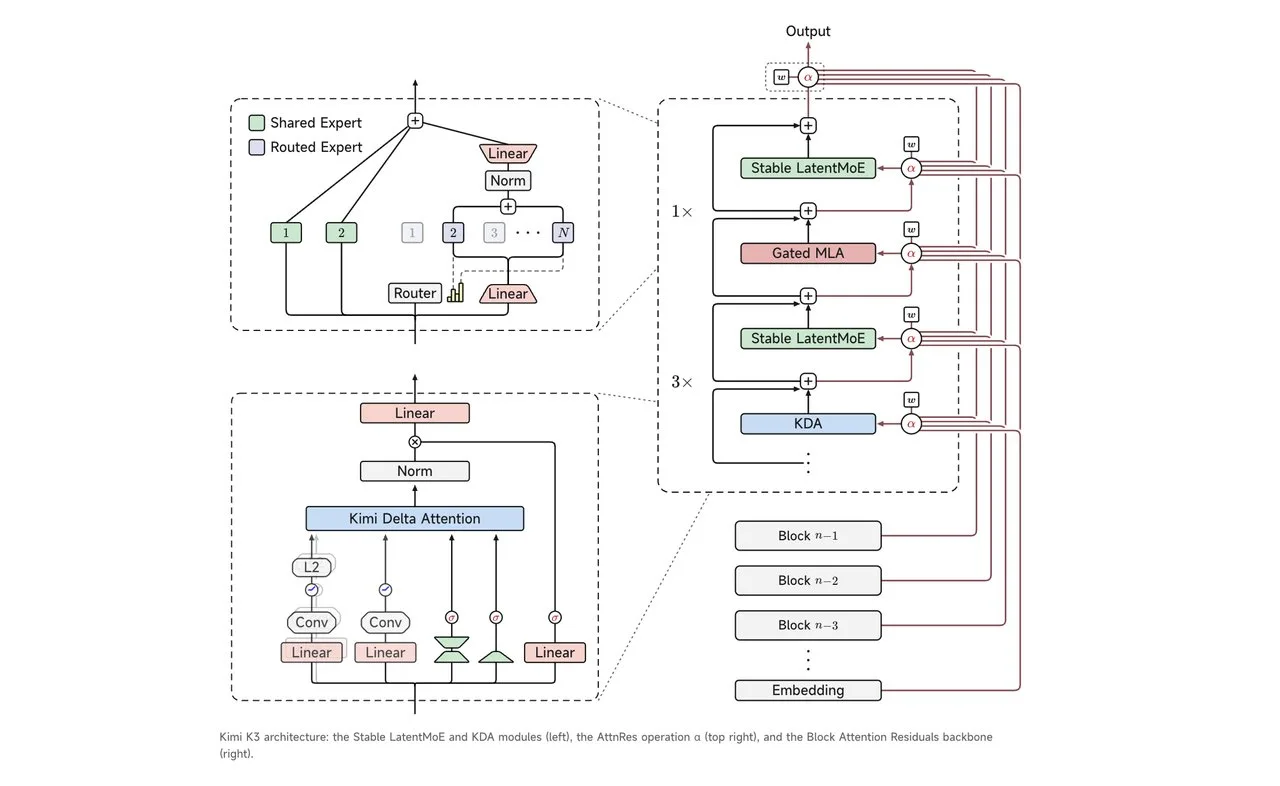
Source: Official K3 launch materials via @Kimi_Moonshot / Kimi K3 blog, July 16, 2026.
Myths that drain wallets
| Myth | Reality |
|---|---|
| “Open weights = free API” | Open-weight download plans ≠ unlimited hosted inference. Weights timeline: July 27 reality check. |
“I found a free kimi-k3 key online” | Almost always stolen, fake, or bait. Create your own key. |
| “1M context means I should always paste the whole monorepo” | You can; you also pay for what you paste (unless cached). |
| “K3 is always cheaper than Claude/OpenAI” | Compare your workload. Output-heavy agents can erase headline savings. |
| “I’ll just use K3 for every autocomplete” | That’s how you discover $15/M the hard way. Route bulk elsewhere. |
Self-host after weights land is a hardware + ops bill, not a free API coupon—see VRAM / Ollama reality.
What you should do this week
If you only want to try the model: stay on the product path—free options and how to use K3 this week. Don’t force an API key for curiosity.
If you ship software:
- Create a key on platform.kimi.ai (or OpenRouter if you already live there).
- Wire
kimi-k3only on the “hard job” path. - Turn on caching where docs allow; measure hit rate after a day.
- Put a daily spend cap before you leave an agent running.
- Keep official pricing open in a tab—blog posts go stale; the rate card is the contract.
Where next
- Hub with specs + switch rules → /kimi-k3
- Status / timeline → /kimi-k3-status
- Free product honesty → /blog/33-kimi-k3-free-how-to
- App vs API doors → /blog/36-how-to-use-kimi-k3
- Open weights calendar → /blog/31-kimi-k3-open-weights-july-27
- Coding SKU hub → /kimi-code · /kimi-k27
Bottom line: Kimi K3’s API is a frontier-priced tool with a huge cache discount and expensive output. Use it where it earns the bill—and stop treating “free api” search results as a pricing page.